


Melo - Dirty Party Game
Play on PC with BlueStacks – the Android Gaming Platform, trusted by 500M+ gamers.

Page Modified on: Oct 17, 2026
Main Melo - Dirty Party Game on PC
The phone gives you the prompt. Your friends provide the answers, stories and reactions.
HOW TO PLAY
Add your players' names, choose a deck and read the next card aloud. Answer a question, take on a challenge or let the whole group join in. Pass the phone around and keep the game going.
No accounts, printed cards or complicated rules to explain.
QUESTIONS, CHALLENGES AND UNEXPECTED ANSWERS
Get people talking with conversation starters, Never Have I Ever cards and creative dares. Share a story, find out something new about a friend or see how everyone handles the next challenge.
Play as a couple when you want something different to talk about, or bring the whole group into the conversation.
CHOOSE A DECK FOR YOUR GROUP
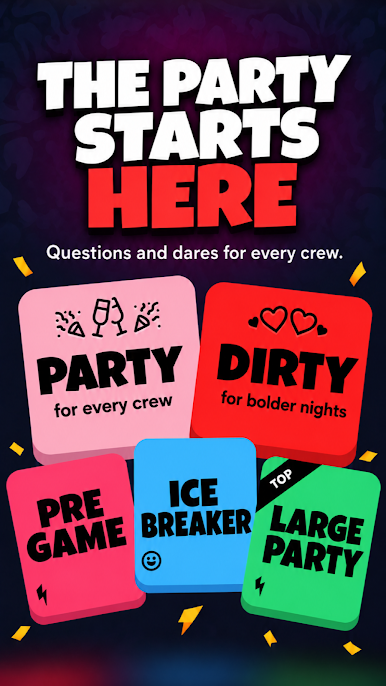
Start with Icebreaker when people are getting to know each other. Explore decks for house parties, birthdays and couples, with content ranging from light questions to more daring challenges.
Choose the mood that suits the people in the room, whether you are meeting new friends or playing with people you have known for years.
PLAY OFFLINE, AT YOUR OWN PACE
Take Melo on a group trip or bring it out for a night in. The game works offline, so you do not need Wi-Fi to play.
Skip any question or challenge that does not suit you. Play a few rounds or keep going while the group is enjoying it.
FREE CONTENT AND PREMIUM DECKS
Melo includes free content to try. A paid subscription unlocks premium decks and additional content. The 3000+ questions and challenges span the full collection, including premium content.
Pick a deck and see where the conversation goes.



Play Melo - Dirty Party Game on PC. It’s easy to get started.
-
Download and install BlueStacks on your PC
-
Complete Google sign-in to access the Play Store, or do it later
-
Look for Melo - Dirty Party Game in the search bar at the top right corner
-
Click to install Melo - Dirty Party Game from the search results
-
Complete Google sign-in (if you skipped step 2) to install Melo - Dirty Party Game
-
Click the Melo - Dirty Party Game icon on the home screen to start playing


