


Cozy Adventures: Fairy Garden
Play on PC with BlueStacks – the Android Gaming Platform, trusted by 500M+ gamers.

Page Modified on: Oct 22, 2026
Play Cozy Adventures: Fairy Garden on PC
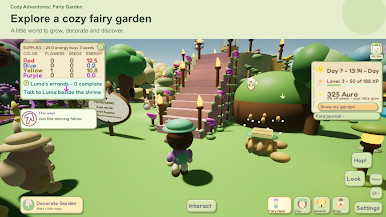
Welcome to Cozy Adventures: Fairy Garden, a cozy learning adventure full of flowers, tiny friends, music, and woodland discoveries. Create your gardener, explore at your own pace, and learn through the things you do.
A NOTE FROM NOAH
I learned to read through games when I was four, independently and without parent participation. That experience inspired Fairy Garden: connecting words with actions and practicing vocabulary through repeated, enjoyable activities. Language learning is optional and can be turned off.
WORDS THAT CONNECT WITH YOUR ADVENTURE
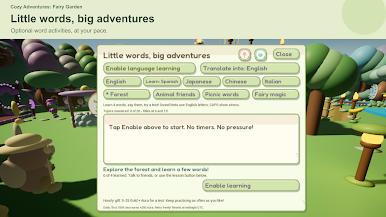
Practice words in English, Spanish, Japanese, Mandarin Chinese, and Italian. Short dialogue and simple sentences connect words with familiar objects and activities. Mandarin Chinese lessons use Simplified characters and Pinyin pronunciation guides. Try short topic tests, see your results, and practice again without pressure. These activities introduce vocabulary; they are not a complete language course.
TRY A LITTLE MUSIC
Discover beginner lessons about the ukulele, bongos, flute, and guitar in your hideaway. Listen to a tune, count a steady beat, try an air-strum, and notice notes rising and falling. No musical experience needed.
GARDENING, PETS AND COZY ADVENTURES
- Grow colorful flowers, gather resources, and help neighbors with simple errands.
- Care for pets and spend time with your tiny companions.
- Explore woodland dungeons where wandering creatures rest with gentle spells.
- Bounce through the Mushroom Grove, dance in the fairy ballroom, and decorate your hideaway.
- Say hello to a friendly nighttime ghost who shares a little energy.
Your fairy guide helps you find your next activity.
MEET YOUR BIRTHDAY BUDDY
Choose a friendly Birthday Buddy, visit for a hello and a temporary boost, and give flower gifts to build friendship and discover stories. You do not need to share your real birthday.
LOCAL CO-OP: PLAY TOGETHER NEARBY
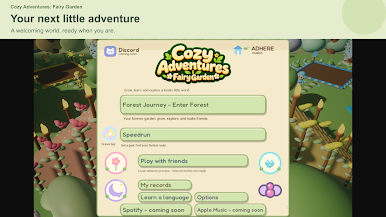
Share adventures with 2–4 players on the same local network. Explore the garden, dungeons, Mushroom Grove, hideaway, and ballroom together. Everyone joins before the adventure starts, and the host chooses where the party goes. Shared adventures use session progress separate from your solo garden.
Cooperative play requires matching family-edition versions on the same Wi-Fi network. Internet multiplayer is not available yet.
CHOOSE YOUR PACE
Relax in Forest Journey or try optional solo Speedrun goals with personal records saved on your device. Challenge saves stay separate from your regular garden.
MAKE YOURSELF AT HOME
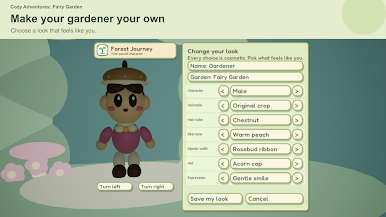
Customize your gardener, collect gear, and enjoy the original soundtrack. Landscape touch controls, separate music and sound levels, graphics options, and Gentle motion let you adjust the experience. Play the solo garden offline, with progress saved on your device. Local multiplayer requires matching versions on the same Wi-Fi network. Purchases and external music links require internet access.
For curious children and adults, experienced gamers and first-time adventurers: read a little, try a little, and discover what happens.
FREE PLAY AND PURCHASES
Download and play free. Character, pet, and Birthday Buddy progression reaches level 15; professions reach level 100. A one-time full-game purchase lets you continue leveling while keeping your save. Optional Dream Token packs are sold separately. Prices appear in your local currency before purchase.
Play Cozy Adventures: Fairy Garden on PC. It’s easy to get started.
-
Download and install BlueStacks on your PC
-
Complete Google sign-in to access the Play Store, or do it later
-
Look for Cozy Adventures: Fairy Garden in the search bar at the top right corner
-
Click to install Cozy Adventures: Fairy Garden from the search results
-
Complete Google sign-in (if you skipped step 2) to install Cozy Adventures: Fairy Garden
-
Click the Cozy Adventures: Fairy Garden icon on the home screen to start playing


